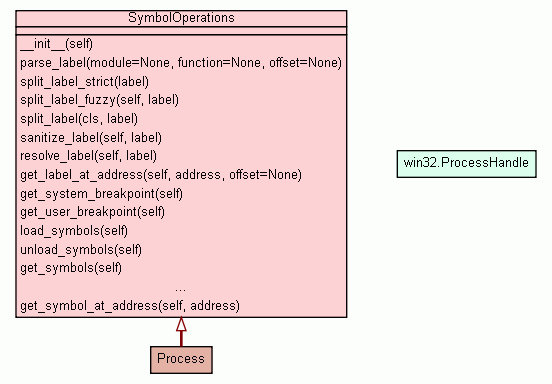
Package winappdbg :: Module system :: Class SymbolOperations
[hide private]
[frames] | no frames]

Class SymbolOperations


Encapsulates symbol operations capabilities.

Requires a ModuleContainer.


Note: Labels are an approximated way of referencing memory locations across different executions of the same process, or different processes with common modules. They are not meant to be perfectly unique, and some errors may occur when multiple modules with the same name are loaded, or when module filenames can't be retrieved.

Read more on labels here: http://apps.sourceforge.net/trac/winappdbg/wiki/HowLabelsWork

Instance Methods [hide private]
 
__init__(self)
x.__init__(...) initializes x; see x.__class__.__doc__ for signature
 
__use_fuzzy_mode(self, label)

Inherited from object: __delattr__, __getattribute__, __hash__, __new__, __reduce__, __reduce_ex__, __repr__, __setattr__, __str__

    Labels
tuple( str or None, str or int or None, int or None )
split_label_fuzzy(self, label)
Splits a label entered as user input.
str
sanitize_label(self, label)
Converts a label taken from user input into a well-formed label.
int
resolve_label(self, label)
Resolve the memory address of the given label.
str
get_label_at_address(self, address, offset=None)
Creates a label from the given memory address.
    Symbols
 
load_symbols(self)
 
unload_symbols(self)
 
get_symbols(self)
 
iter_symbols(self)
 
resolve_symbol(self, symbol)
 
get_symbol_at_address(self, address)
    Debugging
int
get_system_breakpoint(self)
Returns: Memory address of the system breakpoint within the process address space.
int
get_user_breakpoint(self)
Returns: Memory address of the user breakpoint within the process address space.
Class Methods [hide private]
    Labels
tuple( str or None, str or int or None, int or None )
split_label(cls, label)
Splits a label into it's module, function and offset components, as used in parse_label.
Static Methods [hide private]
    Labels
str
parse_label(module=None, function=None, offset=None)
Creates a label from a module and a function name, plus an offset.
tuple( str or None, str or int or None, int or None )
split_label_strict(label)
Splits a label created with parse_label.
Properties [hide private]

Inherited from object: __class__

Method Details [hide private]

__init__(self)
(Constructor)


x.__init__(...) initializes x; see x.__class__.__doc__ for signature

Overrides: object.__init__
(inherited documentation)

parse_label(module=None, function=None, offset=None)
Static Method


Creates a label from a module and a function name, plus an offset.

Parameters:
  • module (None or str) - (Optional) Module name.
  • function (None, str or int) - (Optional) Function name or ordinal.
  • offset (None or int) - (Optional) Offset value.

    If function is specified, offset from the function.

    If function is None, offset from the module.

Returns: str
Label representing the given function in the given module.
Raises:
  • ValueError - The module or function name contain invalid characters.

Warning: This method only parses the label, it doesn't make sure the label actually points to a valid memory location.

split_label_strict(label)
Static Method


Splits a label created with parse_label.

To parse labels with a less strict syntax, use the split_label_fuzzy method instead.

Parameters:
  • label (str) - Label to split.
Returns: tuple( str or None, str or int or None, int or None )
Tuple containing the module name, the function name or ordinal, and the offset value.

If the label doesn't specify a module, then module is None.

If the label doesn't specify a function, then function is None.

If the label doesn't specify an offset, then offset is 0.

Raises:
  • ValueError - The label is malformed.

Warning: This method only parses the label, it doesn't make sure the label actually points to a valid memory location.

split_label_fuzzy(self, label)


Splits a label entered as user input.

It's more flexible in it's syntax parsing than the split_label_strict method, as it allows the exclamation mark (!) to be omitted. The ambiguity is resolved by searching the modules in the snapshot to guess if a label refers to a module or a function. It also tries to rebuild labels when they contain hardcoded addresses.

Parameters:
  • label (str) - Label to split.
Returns: tuple( str or None, str or int or None, int or None )
Tuple containing the module name, the function name or ordinal, and the offset value.

If the label doesn't specify a module, then module is None.

If the label doesn't specify a function, then function is None.

If the label doesn't specify an offset, then offset is 0.

Raises:
  • ValueError - The label is malformed.

Warning: This method only parses the label, it doesn't make sure the label actually points to a valid memory location.

split_label(cls, label)
Class Method


Splits a label into it's module, function and offset components, as used in parse_label.

When called as a static method, the strict syntax mode is used:

   winappdbg.Process.split_label( "kernel32!CreateFileA" )

When called as an instance method, the fuzzy syntax mode is used:

   aProcessInstance.split_label( "CreateFileA" )
Parameters:
  • label (str) - Label to split.
Returns: tuple( str or None, str or int or None, int or None )
Tuple containing the module name, the function name or ordinal, and the offset value.

If the label doesn't specify a module, then module is None.

If the label doesn't specify a function, then function is None.

If the label doesn't specify an offset, then offset is 0.

Raises:
  • ValueError - The label is malformed.

__use_fuzzy_mode(self, label)


See Also: split_label

sanitize_label(self, label)


Converts a label taken from user input into a well-formed label.

Parameters:
  • label (str) - Label taken from user input.
Returns: str
Sanitized label.

resolve_label(self, label)


Resolve the memory address of the given label.

Parameters:
  • label (str) - Label to resolve.
Returns: int
Memory address pointed to by the label.
Raises:
  • ValueError - The label is malformed or impossible to resolve.
  • RuntimeError - Cannot resolve the module or function.

Note: If multiple modules with the same name are loaded, the label may be resolved at any of them. For a more precise way to resolve functions use the base address to get the Module object (see Process.get_module) and then call Module.resolve.

If no module name is specified in the label, the function may be resolved in any loaded module. If you want to resolve all functions with that name in all processes, call Process.iter_modules to iterate through all loaded modules, and then try to resolve the function in each one of them using Module.resolve.

get_label_at_address(self, address, offset=None)


Creates a label from the given memory address.

Parameters:
  • address (int) - Memory address.
  • offset (None or int) - (Optional) Offset value.
Returns: str
Label pointing to the given address.

Warning: This method uses the name of the nearest currently loaded module. If that module is unloaded later, the label becomes impossible to resolve.

get_system_breakpoint(self)

 
Returns: int
Memory address of the system breakpoint within the process address space. Returns None on error.

get_user_breakpoint(self)

 
Returns: int
Memory address of the user breakpoint within the process address space. Returns None on error.